vertcie

Platform overview

One platform for product data, media operations, and 3D delivery.

Vertcie gives brands one operating layer for product data, media operations, and downstream delivery. Teams can structure product records, manage 2D and 3D assets, and ship approved outputs without rebuilding context between systems.

Content types

2D + 3D

Operating model

One hub

Downstream speed

Real time

Unified product records

Bring specifications, variants, compliance details, and media references into one structured product system.

2D and 3D asset operations

Manage renders, imagery, video, documents, and 3D models as connected product assets.

Real-time deployment

Deliver approved product data and assets downstream in real time to commerce, sales tools, and immersive product experiences.

How the platform works

Built for the full path from product making to product publishing.

Most teams still split product information, media management, and 3D production across separate systems. That slows approvals, creates version drift, and forces teams to rebuild context before anything ships. Vertcie keeps that flow connected from source data through final deployment.

One shared product truth

Vertcie drives 2D and 3D creation from the exact same underlying product data.

The same structured record, variant logic, and workflow state can generate renders, cutouts, product imagery, model derivatives, and deployment-ready asset sets without splitting teams across separate systems or duplicating product context.

Real value

The payoff is operational. Teams spend less time chasing files, rebuilding decisions, and repackaging outputs, and more time moving approved product content into the channels that need it.

Model the catalog

Define the product structures, variants, and relationships that give every asset operational context.

Coordinate production

Keep product teams, 3D creators, and reviewers aligned on the latest approved files and decisions.

Deploy everywhere

Publish the right asset package into every downstream environment that depends on accurate content.

Workflow authoring

Real workflow control inside the same product system.

Vertcie is not just where assets end up. It is where teams define workflow logic, manage approvals, and keep product decisions attached to the records and files that move downstream.

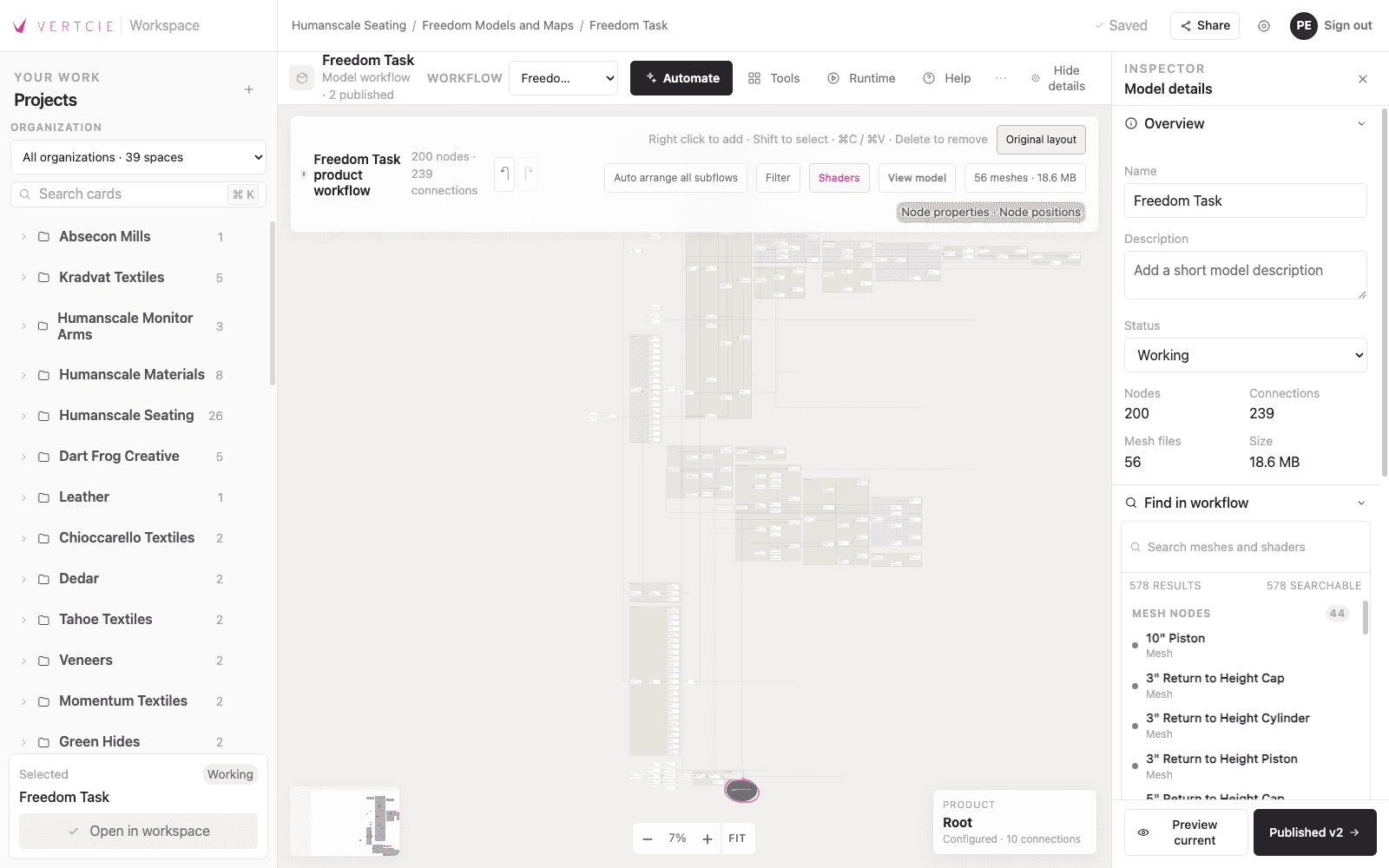
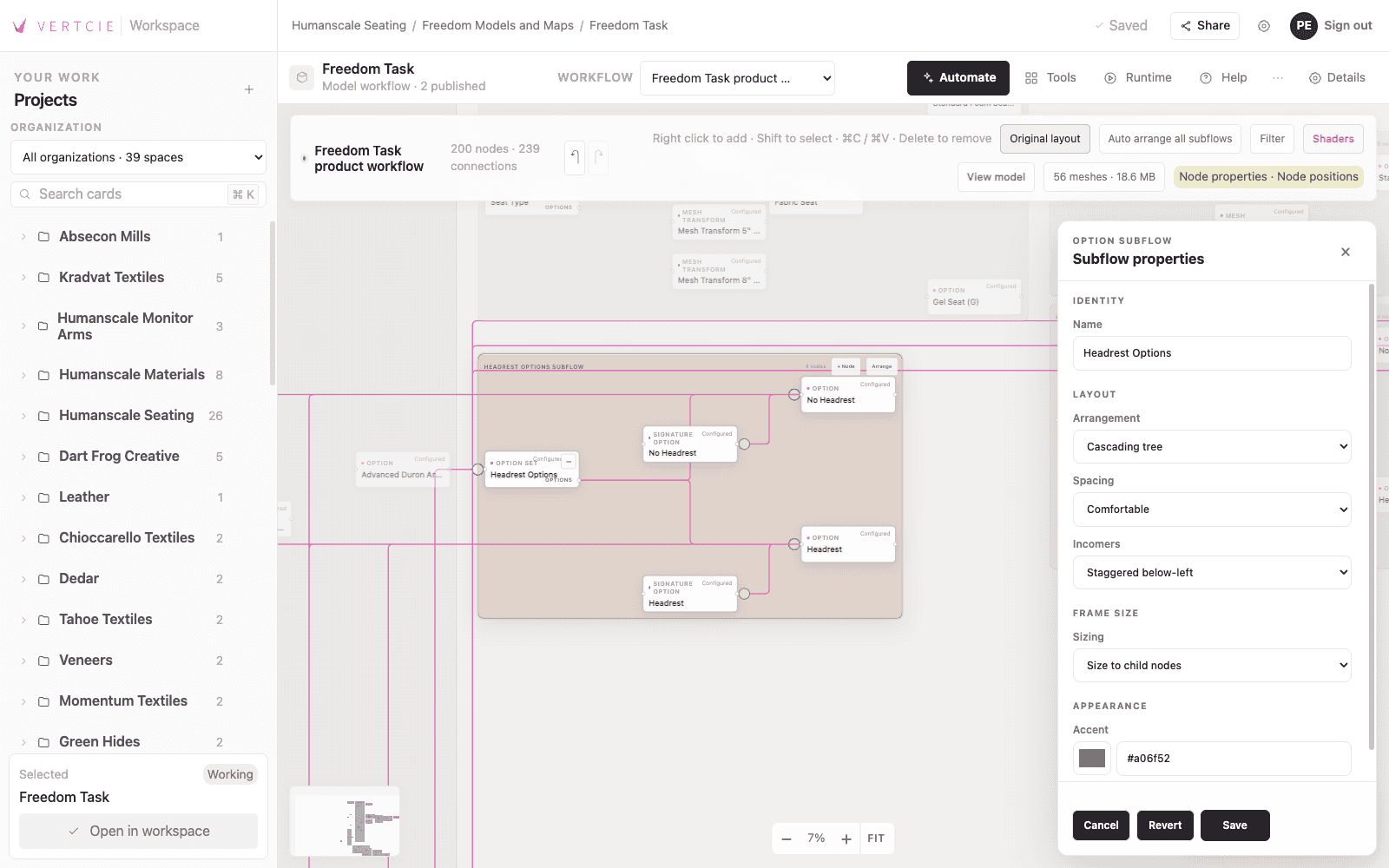
Live workflow canvas

This beta view shows actual node-based workflow authoring inside the product, with editing controls and configuration panels in the same workspace.

Actual in-product capture

Workflow authoring with a live node graph, review-ready controls, and an editable inspector panel.

Vertcie beta workflow authoring interface with a node canvas and editable configuration panels.

Production-ready 3D

Production-grade 3D assets built for the web, not just presentation.

Vertcie supports 3D output that is visually strong and operationally ready. Teams can manage high-fidelity product assets with the controls needed for real web delivery, production workflows, and downstream implementation.

Real product asset view

This screen shows a production-grade 3D product asset inside the platform, presented with the fidelity expected by product teams while staying optimized for real-world web use.

Actual in-product capture

High-fidelity 3D product presentation, prepared for production workflows and web delivery.

Vertcie product screen showing a high-fidelity 3D chair asset prepared for production and optimized for web delivery.

Merchandising and launch teams

Get one product-ready record instead of reconciling specs, imagery, and 3D outputs from different owners.

Studios and 3D production partners

Work from approved product context and variant logic without relying on side-channel file exchanges.

Developers and implementation teams

Receive cleaner asset packages and structured data for commerce builds, configurators, and immersive surfaces.

Boards and cards

Boards show the work in motion. Cards hold the actual product media.

Boards give teams a working surface for product activity, while cards hold the assets moving through that workflow. A card can contain a model, an image, or a movie, so review, organization, and downstream use stay tied to the same product context.

Built-in render engine

The screenshot shows cards populated with presentation-ready renderings generated by the built-in photo-realistic render engine inside the same system that manages the product record and workflow state.

Card payloads

Cards can represent product models, images, or movies, which keeps review, organization, and downstream use tied to the same product context.

Actual in-product capture

Vertcie Board showing cards filled with rendered outputs created by the built-in photo-realistic render engine.

Vertcie Board showing cards with rendered product outputs created by the built-in photorealistic render engine.

Integrated tools

Product tools that stay connected to the same data, workflow, and scene logic.

Vertcie includes integrated tools for building, editing, generating, and extending product outputs without pushing teams into disconnected utilities. Open each tool below to see how it fits into the same operating system.

Each tool is part of the same product record, workflow state, and scene logic rather than a separate handoff.

Render Studio and Compute

Four image delivery paths. One product data model.

Teams can create 2D assets directly inside Vertcie through Render Studio without taking on a Compute add-on. The Compute options only layer in when output volume, hardware ownership, or delivery speed make them necessary.

Core path

Render Studio inside Vertcie, no Compute add-on required.

Burst rendering

Compute One for optional pay-per-image external rendering.

Owned hardware

Compute Two when teams want to use their own infrastructure.

Higher-speed delivery

Compute Three for real-time 2D delivery and queue control.

Render Studio

Vertcie users can produce 2D assets inside the platform without a Compute service add-on.

  • Create 2D assets directly in Vertcie
  • Use Render Studio as part of the core platform flow
  • No Compute add-on required

Compute One

Optional pay-per-image rendering through external GPU infrastructure, typically returned within 24 hours.

  • Pay per image
  • External GPU rendering
  • Typically returned within 24 hours

Compute Two

For teams that want to use their own hardware and keep queue operations under their own control.

  • Use your own hardware
  • Manage your own queue data
  • Optional add-on to the platform

Compute Three

The highest-control option, adding real-time 2D delivery and queue management for internal GPU resources.

  • Real-time delivery of 2D assets
  • Queue management for internal GPU resources
  • Top-tier compute offering

Output scale

One workflow can produce hundreds of thousands of 2D and 3D outputs because every derivative is generated from the same product data, configuration logic, and operational state.

Vertcie client

Simple to add. Complete enough to ship. Flexible enough to build on.

The Vertcie client is designed to drop into product experiences without heavy integration overhead. Teams can launch with the built-in experience first, then go deeper into developer controls when they want something more custom.

Full product expanders

Full product expanders provide a complete configurator end product at no additional cost.

Brands can move from structured product data to a complete interactive configurator without licensing an extra viewer layer. The same product logic that drives asset generation can also drive the client experience downstream.

Developer classes

Robust classes give developers every available tool to interact with the Vertcie 3D scene, build new tools, extend existing ones, and manufacture unique branded experiences on top of the same core client.

Actual in-product capture

Production mode

Vertcie client production mode showing a product-ready 3D presentation interface.

Drop the Vertcie client into an experience and ship a product-ready 3D surface without building the full viewer stack from scratch.

Actual in-product capture

Developer mode

Vertcie client developer mode showing tools for interacting with and extending the Vertcie 3D scene.

Switch into developer mode to expose the scene tooling, hooks, and control surface needed to extend the client for custom branded experiences.

FAQ

Practical questions teams ask before they commit.

Vertcie is designed to fit into real product operations, work with existing partners, and create immediate value without forcing brands into a closed stack.

Can Vertcie work with other customer-facing 3D tools?

Yes. That is the point. Vertcie is product data management at its core, giving teams a place to approve, stage, and manage products for downstream applications. It also includes customer-facing 3D tools and 2D rendering out of the box for immediate ROI, at no additional cost.

Where do the models come from?

Vertcie is built for the web and modern digital media, so we require web-ready models. We can supply them, or we can work with your existing 3D content creators to Vertcie-certify their output so you can keep using current resources.

What if I want other tools?

That is already part of the platform. We can certify your developers to use Vertcie APIs to create sales and marketing tools that depend on 3D or 2D media.

How do you handle demos?

If you can supply web-ready models, we can put together a no-cost demo using your actual product so you can evaluate Vertcie in a real context before moving forward.

Is Vertcie just another configurator platform?

No. Vertcie is a platform to build from. Configurators are one downstream outcome, not the full value proposition.

Can I update my own workflows?

Yes. Vertcie is designed to make workflow updates accessible, including for non-technical users.

How do we brand the out-of-the-box solution?

Easy. Branding is included with onboarding. Fonts, colors, and most core UI aspects can be tailored.*

How do I request changes or updates beyond our organization’s abilities?

Create a ticket and we will route it to the right content creation partners or developers. We support your partners and your internal team through the same system.

What if my product requires special features?

Vertcie is node-based, so in most cases we can add features that support specific product requirements and tailor the experience to the product.

What about products that benefit from animation?

That is in the windshield. Vertcie is positioned to support a more complete product experience as those needs expand.

* Additional UI features can be added by your developer of record.

Next step

Built for teams shipping product experiences, not just storing files.

Vertcie gives product makers, content teams, and developers a shared place to manage the assets that define a product and move them into market-facing channels.